Sunday, November 18, 2012

Replacing a DVR Hard Drive

Every few years the DirecTV/TIVO unit driving the family room television decides own its own that it has recorded enough programming and deserves retirement.  It starts by spontaneously rebooting itself every few days, and near the end, reboots numerous times on a daily basis.  I know I should replace the DVR with a new HD unit, but I just can't justify the added expense (HD upcharges, DVR cost, etc) based on the quality of garbage on television these days;   Also, this unit has served me so well for so long that, well, its just hard to part with.


Over the last decade, this scenario has happened a few times, and I've found the replacement parts from weaknees.com to be reliable and reasonably priced.  The instructions included are simple to follow, and swapping out a hard drive could not be easier.  I also elected to replace the case fan, as the accumulated dust just refused to be cleaned any further.


As can be seen above, quite a bit of dust has settled on the system boards as well.  Its quite a mess, but nothing the mighty DATAVAC Electric Duster can't handle.  After a few seconds of air blasting the box, its as good as new.


Since its been a number of years since I last replaced the drive, SATA has taken over the market and retired the old IDE-spec drives.  Weaknees.com now ships a SATA drive replacement unit, as well as a small converter board to keep the old TIVO happy.
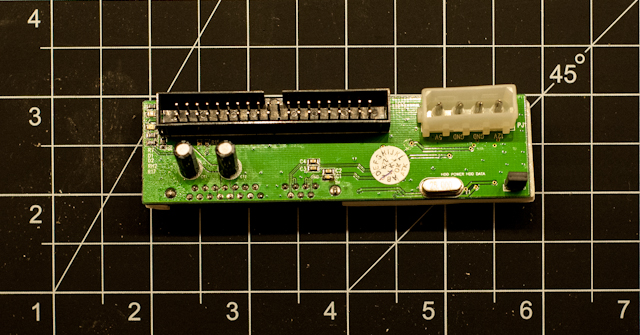


After reconnecting the new drive and reassembling the case, the new drive is fully functional and TIVO is back to normal.  I thought about taking the time to image the new drive before connecting it (with the thought that if the drive fails again, I can just burn an image to a drive purchased from Amazon.com and save a few bucks) but in the end decided the effort just wasn't worth the time.

Sunday, November 4, 2012

Driving a simple speaker with an Arduino

Not that there was much to the project, but in efforts to bring some basic audio skills into my toolbox, an 8ohm speaker was purchased and hooked up to an Arduino Rev3 via a 100ohm resistor.  The parts are listed below:

[Mouser 253-CE405-RO] Kobitone 8ohm 1.57" Speaker
[Mouser 291-100-RC] Xicon 100ohm Carbon Film Resistors

Two 22AWG wires were soldered onto the speaker, making it ready for use.


The code used to drive the speaker is fairly simple as well; Here are links to the original material I used as reference:

Arduino Tone
Arduino Play Melody

Monday, October 29, 2012

Keurig B70 Disassembly

Thanks to Hurricane Sandy shutting down Northern Virginia, I had some time this morning to jump into a project that has been waiting for attention for close to two months. 

After almost 7 years of faithful service, my Keurig B70 coffee machine decided to call it quits.  I ordered a replacement unit, and put the old one on a shelf for later investigation.  I initially thought that maybe I could repair it and keep it is a backup, but those notions quickly disappeared after the equipment breakdown started.


There are not a lot of visible screws on the unit; There are a few on the bottom, so that is where I started disassembly.  With no idea how things were put together, I stuck to the "find a screw, remove a screw" process.


About 20 minutes into the process, I gave up on the idea of servicing the B70.  I now understand why Keurig does not have service centers and/or recommended repair shops - these things are clearly not meant to be disassembled.  With that change in mindset, things got a bit easier, as breaking parts was no longer a concern, and keeping track of which screws went with which parts also did not matter.  As with most products, there are a bazillion screws, and very few have the exact same size and/or threading.  Here is the pile of screws from when all was said and done:


My primary focus was now to find the brains, as well as the pumps, for the B70 - just curiosity more than anything.  While breaking things apart, I was expecting to see a lot of calcium or other deposits in the water lines, clogging things up and leading to unit failure.  However, I in fact found almost none.  It would appear the pump just quit due to age/use.


After a little more struggle, I found and pulled the circuit board as well as the screen.  I was a bit surprised that the screen was just a dot matrix array, I would have thought for their manufacturing runs that they would have had a custom part made.  Another surprise was the quality of soldering on the boards - the one board looked hand soldered (joints were too sloppy for a machine).  I know I jumped on the K-Cup wagon before most and had an early unit, but I was really surprised over this...


All things considered, it was a fairly interesting breakdown.  I'll save the boards and research them further in the future as time allows.

Thursday, September 13, 2012

Testing a 38KHz IR Sensor

Thanks to the tutorial on the AdaFruit Learning System, testing a new 38KHz IR sensor was a 5 minute exercise.  The parts used for this test were:
  • 1 x TSOP38238 38KHz IR Sensor [AdaFruit-157]
  • 1 x T 1 3/4 Blue LED [Mouser 604-WP7113QBC/G]
  • 1 x 220ohm 1/4 watt resistor [Mouser 291-220-RC]
and were connected as follows:


In order to test the sensor, an LED was connected between Vcc and the Vout pin (via a current limiting resistor).  If the IR sensor detects a 38KHz modulated pulse wave (PWM), it pulls the Vout pin low, thereby completing the circuit and lighting the LED.
 

After powering the circuit, the closest TV remote control was used to test the sensor.


Sunday, September 2, 2012

Using the RHT03 temperature and humidity sensor

Continuing along with temperature observation weekend, today an RHT03 temperature and humidity sensor was interfaced to an Arduino.  As far as I can tell, the RHT03 sensor also goes by the name DHT22.  A number of articles are already online on this device; The best review I found was on Hacker Reviews, with the best set of documentation located here at AdaFruit.

Using the code library provided from AdaFruit, the sensor was hooked up and running within 30 minutes.  Instead of using the serial monitor, I piped the output to my LCD panel, and all appeared well on the first run.

First impressions are good - the temperature reading is very stable compared to the TMP36 (but as 5x the cost, I'd expect that), and the humidity sensor agrees with another reader I have on hand.  The footprint of the device is quite large compared to the TMP36, and the code baseline is a little larger to get comms going, but if you need something a bit more accurate, it appears this component is the answer.  See below for pictures of the implementation...


Saturday, September 1, 2012

Using Analog Devices TMP36 Temperature Sensor

In order to get some interesting data to display on the LCD panel, a TMP36 temperature sensor was purchased.  A tutorial on AdaFruit was followed for this exercise, and I found it to be quite thorough and well written.

Before connecting the TMP36 to the Arduino, an initial test was performed on the sensor.  It was connected to +5V and GND, and using a multimeter, the Vout pin was read and gave a result in the expected range for my lab which is in desperate need of a little more air conditioning.  Placing a finger on the TMP36, the reading was seen to go up, and putting a soda can against the sensor was also observed to make the reading go down.


The next step was connecting the TMP36 to analog pin 0 on the Arduino.  A quick sketch later, and the LCD panel was reading the rooms ambient temperature.  Unfortunately, the readings (even taken every few seconds) were fairly erratic (values of +/- 8 degrees were observed).  After a bit more reading and investigation, this would seem to be due to noise on the +5V line.


In efforts to get a better reading, the TMP36 was moved from +5V power to +3.3V power, and the AREF pin on the Arduino was used to adjust the analog pin readings.  That calmed the reading jitter down a little (but it was still a bit too unstable for my tastes), and as an unfortunate side-effect, the values started reporting the room temperature to be a bit too high.  Going back to the multimeter, I discovered that my +3.3V line was actually closer to +3.2V.  Adjusting the math in the sketch to account for this voltage difference put the room temperature within expected limits.


Going back to the TMP36 datasheet, the vendor recommended putting a .1uF ceramic capacitor with short leads onto the positive pin of the sensor.  Unfortunately, I did not have one of those laying around, but did have a 100uF 100V capacitor that I plugged in to the circuit (a bit of overkill, but when its all that was available...).  That immediately calmed the readings down to fluctuate between the expected +/- 1 degree.


That is about as far as I plan to take this circuit for the moment.  I have a DHT22 temperature and humidity sensor I'll try out first, before deciding whether its worth my time to go back and write some temperature averaging code to clean up the LCD display.

Thursday, August 30, 2012

Creating a GitHub Library for Downloads

Since blogspot does not support uploading files, Spare Time Notebook needed to find an alternate location for dumping non-image files on the internet.  Since some of these files over time will most likely be source code (Java / Arduino / etc), the decision was made to create an open source project on GitHub.


The location for the new repository is:
https://github.com/sparetimenotebook/sparetimenotebook

The first file posted was a zip file containing the project contents from June/July series:

Building an Arduino LCD Interface
http://sparetimenotebook.blogspot.com/2012/06/building-arduino-lcd-interface-part-i.html

and can be located in the downloads:
https://github.com/sparetimenotebook/sparetimenotebook/downloads/sparetimenotebook-lcdpanel-v1.zip